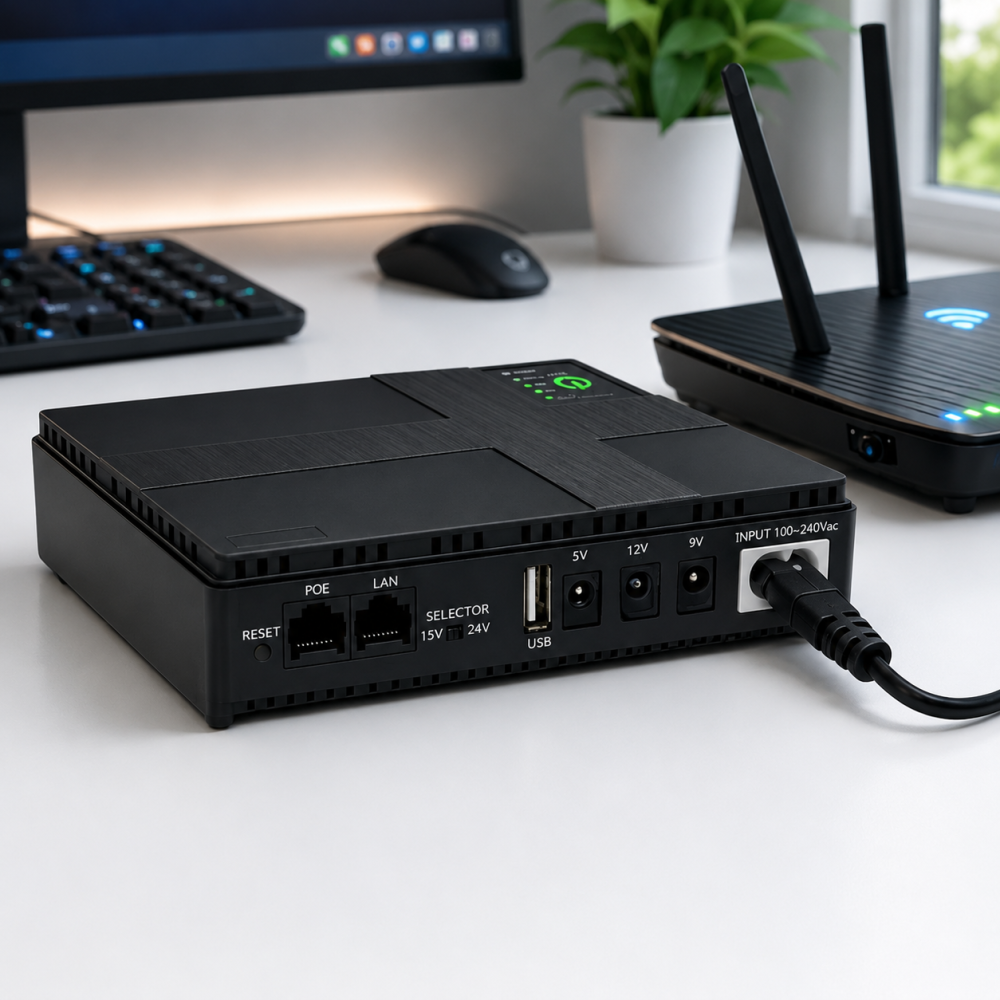

If the electricity goes out and you still need internet, the first question is usually simple: can I power my router with a power bank?
The answer is yes, but with one important condition: your router must receive the correct voltage.
This is where many people make a mistake. A normal phone power bank usually gives 5V through USB. Many home WiFi routers and modems in the Philippines use 12V DC, so plugging a router directly into an ordinary USB power bank will not work unless you use the right converter or a device designed for routers.
If I had to choose one practical setup for a typical home, I would use a mini DC UPS made for WiFi routers, not a random phone power bank. It is cleaner, safer, and easier to leave connected during brownouts.
Quick Answer: What Should You Buy?
For most homes in the Philippines, the best backup power option for a router is:
- A mini UPS with 12V DC output
- Output current that matches or exceeds your router adapter
- Built-in overcharge, overload, and short-circuit protection
- Enough battery capacity for at least 2 to 6 hours of backup
- Correct DC plug size for your router
A regular power bank can work only if it supports the right 12V output or if you use a reliable 5V-to-12V boost cable. But for daily brownout protection, I would choose a mini UPS first.
Why a Normal Phone Power Bank Is Not Always Enough
Most phone power banks are designed for phones, tablets, earbuds, and small USB devices.
A router is different.
Many routers need:
- 12V DC input
- 1A to 2A current
- A round DC barrel connector
For example, PLDT’s Home WiFi device information lists a 12V DC power adapter, which is a good reminder that router backup power is not just about mAh. Voltage matters.
That means a cheap 5V USB power bank may have plenty of capacity but still fail because it does not deliver the correct voltage.
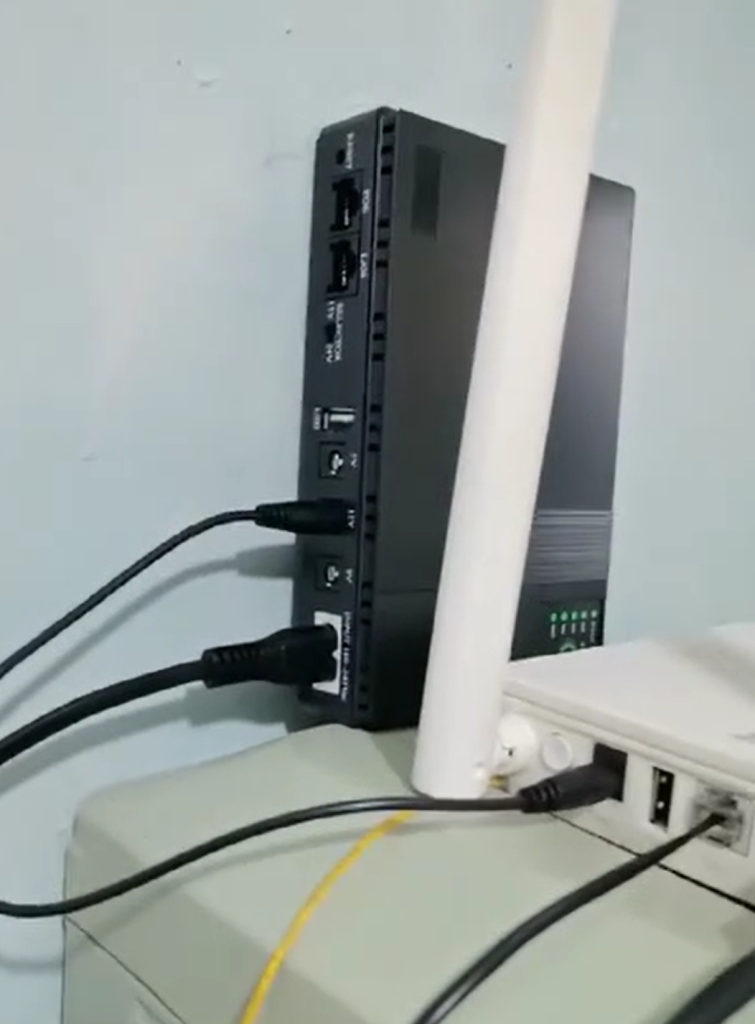
The First Thing I Check: The Router Adapter
Before buying anything, check the power adapter that came with your router.
Look for a label like:
- Output: 12V 1A
- Output: 12V 1.5A
- Output: 12V 2A
- Output: 9V 1A
- Output: 5V 2A
This tells you what your router actually needs.
My rule is simple:
- If the adapter says 12V 1A, use a backup device with 12V output and at least 1A.
- If it says 12V 2A, use 12V 2A or higher.
- Do not use a lower current rating than the router requires.
- Do not guess the voltage.
This one check prevents most problems.
Mini UPS vs Power Bank: What Is Better for a Router?
Here is the practical difference.
| Option | Best For | Main Advantage | Main Risk |
|---|---|---|---|
| Mini DC UPS | Routers, modems, CCTV | Designed for 12V devices | Must match voltage and plug |
| Regular phone power bank | Phones and USB devices | Easy to find | Usually only 5V output |
| Power bank + boost cable | Emergency router backup | Cheap workaround | Cable quality matters |
| Portable power station | Long outages, multiple devices | More powerful | Expensive and bulky |
For most Filipino homes, the mini UPS is the best balance.
It is small, affordable, and made for exactly this kind of job.
What I Would Personally Use
For a home WiFi router, I would choose one of these setups.
Option 1: Mini UPS with 12V Output
This is my first choice.
A good router mini UPS should have:
- 12V DC output
- 1A to 2A output depending on your router
- automatic switching during power loss
- battery protection
- correct connector size
This type of setup is popular in the Philippines because it can keep WiFi running during short interruptions, brownouts, or quick power cuts.
Some local mini UPS products are specifically marketed for routers, modems, CCTV, and similar 12V devices. For example, Techbyte describes a mini UPS for WiFi that can power 12V devices and includes overcharge, overload, and short-circuit protection.
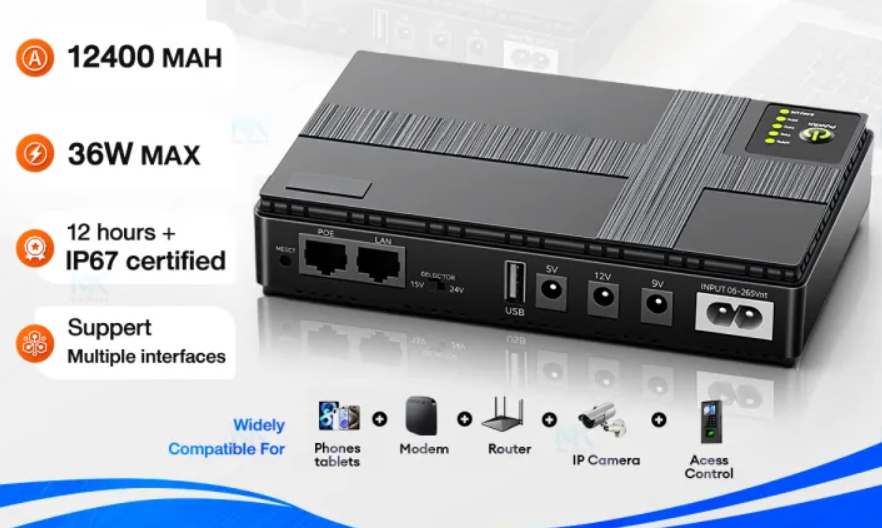
Option 2: Branded Router UPS with Multiple Outputs
If you want something more flexible, look for a unit with 5V, 9V, 12V, and maybe POE support.
For example, Panther’s PUD 362 mini DC UPS lists outputs including USB 5V/2A, DC 5V/2A, DC 9V/2A, DC 12V/2A, and POE 15V or 24V, with a listed price of ₱2,490 on its official product page.
This type is useful if your setup includes:
- router
- modem
- CCTV
- mesh device
- small network equipment
It is not the cheapest option, but it gives more confidence than random no-name units.
Option 3: Regular Power Bank with 12V Boost Cable
This is the budget workaround.
You use:
- a normal power bank
- a USB-to-12V step-up cable
- the correct DC plug for your router
These cables are commonly sold for PLDT, Globe, and Converge router setups, and some listings advertise USB-to-12V booster cables for router use. (Shopee)
I only recommend this as a backup solution, not the cleanest daily setup.
Why?
Because the quality of the boost cable matters a lot. A weak cable can cause:
- router restart loops
- unstable internet
- heat
- voltage drop
- sudden shutdowns
If you go this route, use a decent power bank and a cable with the correct voltage and current rating.
How Long Can a Power Bank Run a Router?
This depends on three things:
- battery capacity
- router power draw
- conversion efficiency
The rough formula is:
Runtime in hours = usable battery energy ÷ router watts
Most small routers use around 6W to 12W, but your exact device may differ.
As a practical estimate:
| Battery Size | Router Load | Expected Runtime |
|---|---|---|
| 10,000mAh | low-power router | around 3 to 6 hours |
| 20,000mAh | typical router | around 6 to 12 hours |
| Mini UPS 8,800mAh to 10,400mAh | router/modem | often several hours, depending on load |
Do not take the mAh number too literally. A 10,000mAh battery is usually rated at the internal cell voltage, not at 12V output. After voltage conversion, the usable energy is lower.
That is why Wh is more useful than mAh for router backup planning.
The Big Mistake: Looking Only at mAh
A lot of listings advertise:
- 10,400mAh
- 20,000mAh
- 30,000mAh
But for routers, mAh alone is not enough.
You need to check:
- voltage output
- output current
- connector size
- battery protection
- real user reviews
- whether it supports continuous use
A smaller unit with stable 12V output is better than a huge battery that cannot power the router correctly.
What to Use for PLDT, Globe, Converge, and Prepaid WiFi
For most common home internet setups in the Philippines, the logic is the same:
- Check the adapter label.
- Match the voltage.
- Match or exceed the amperage.
- Use the right DC connector.
- Avoid suspiciously cheap cables or batteries.
Many PLDT Home WiFi devices use 12V DC power according to PLDT’s own device details.
Marketplace listings also commonly sell 12V adapters and router backup accessories for PLDT, Globe, and Converge-type devices, which reflects how common 12V router setups are locally.
Still, do not rely only on the internet listing. Always check your actual adapter.
What Specs I Look For Before Buying
If I were buying one today, I would check these specs first:
Output Voltage
Must match your router.
Common values:
- 12V
- 9V
- 5V
Most home routers are 12V, but not all.
Output Current
If your router adapter says 12V 1A, your backup should provide at least 12V 1A.
If it says 12V 2A, choose 12V 2A or higher.
Battery Protection
Look for:
- overcharge protection
- overload protection
- short-circuit protection
- temperature protection
This matters because router backup devices may stay connected for long periods.
Correct Connector
Router plugs are not all the same size.
Before buying, check:
- DC barrel size
- included adapter tips
- whether the seller mentions compatibility
Continuous Charging Support
A router UPS should safely stay connected between the wall outlet and the router.
This is different from a normal phone power bank, which may not be ideal for permanent inline use.
Why a Mini UPS Is Better During Brownouts
A mini UPS works like this:
- normal power is available
- the UPS charges itself while powering the router
- power goes out
- the UPS automatically keeps the router running
That automatic switching is the key advantage.
With a normal power bank setup, you may need to manually connect it after the outage starts. That is annoying if you are in a meeting, online class, or remote work session.
For a Philippines home where brownouts can interrupt work, study, or calls, automatic backup is much more convenient.
Is It Safe to Leave a Router UPS Plugged In?
A good-quality mini UPS is designed for that use.
But I would still follow a few rules:
- buy from a reputable seller
- avoid no-name ultra-cheap units
- keep it in a ventilated place
- do not cover it with cloth
- check for unusual heat during the first few days
- replace it if the battery swells or smells unusual
Some router UPS products are marketed as safe to leave connected 24/7 when they include proper protections, but quality still varies by brand and seller.
Can You Use a Laptop Power Bank for a Router?
Sometimes, yes.
If the power bank supports:
- USB-C PD output
- 12V trigger mode
- enough wattage
- stable output
then it can work with the right cable.
But I would not recommend this for beginners because it introduces more points of failure:
- wrong trigger cable
- wrong voltage
- unstable output
- incompatible connector
For most homes, a dedicated mini UPS is simpler.
Can You Use a Car Jump Starter or Big Battery Pack?
Technically, some can work, but I would not use them for a small router unless you know exactly what you are doing.
Why:
- overkill for the job
- bulky
- more expensive
- not always designed for indoor router use
A small 12V UPS is usually the smarter setup.
Best Setup by Situation
For Short Brownouts
Choose:
- 10,000mAh class mini UPS
- 12V output
- correct connector
Good for:
- short outages
- online class
- messaging
- light browsing
For Work From Home
Choose:
- higher-capacity mini UPS
- 12V 2A support
- automatic switching
- trusted brand
Good for:
- meetings
- remote work
- longer interruptions
For Router + Modem Together
You may need:
- higher output power
- multiple DC outputs
- or two separate UPS units
Do not assume one small battery can support everything.
For Mesh WiFi
Check every device separately.
Mesh systems may need:
- multiple backup units
- higher total wattage
- longer runtime planning
Buying Tips for Shopee and Lazada
When checking listings, do not just look at the headline.
Look for:
- 12V output clearly written
- output current clearly listed
- real buyer photos
- reviews mentioning router use
- official store or local warranty
- complete included cable set
Avoid listings with:
- impossible capacity claims
- vague specs
- no amperage listed
- very low price with no reviews
- poor translation and unclear photos
Mini UPS and router backup products are widely sold on Lazada and Shopee, including 5V/9V/12V models and 12V router power accessories.
My Practical Recommendation
If someone asks me, “What power bank do you use for your router when there’s no power?” my answer is:
I would use a 12V mini UPS, not a regular phone power bank.
For most homes:
- 12V output is essential
- 1A to 2A is usually the range to check
- 10,000mAh class is fine for short brownouts
- higher capacity is better for work-from-home setups
- automatic switching is worth paying for
If you already own a good power bank, a USB-to-12V booster cable can work in an emergency. But for daily reliability, a proper router UPS is the better choice.
Common Mistakes to Avoid
- Buying based only on mAh
- Ignoring router voltage
- Using a weak 5V power bank directly
- Choosing the wrong DC plug size
- Buying the cheapest no-name UPS
- Expecting one small unit to run router, modem, and mesh WiFi together
- Keeping the device in a hot enclosed space
FAQ
Can I power my router with a power bank?
Yes, but only if the power bank setup provides the correct voltage and enough current. Many routers need 12V DC, while normal phone power banks usually output 5V.
What is better for a router, power bank or mini UPS?
For most homes, a mini UPS is better because it is designed for routers and can switch automatically during a power outage.
How many hours can a power bank run a WiFi router?
Depending on battery size and router power draw, it may last from a few hours to more than half a day. A 20,000mAh setup usually lasts much longer than a 10,000mAh setup, but voltage conversion affects real runtime.
Can I use a 20,000mAh phone power bank for my router?
Yes, if you use a proper 12V boost cable or USB-C PD trigger setup. But a dedicated mini UPS is usually easier and more stable.
What voltage does a WiFi router use?
Many home routers use 12V DC, but some use 9V or 5V. Always check the label on the original adapter.
Is it safe to leave a mini UPS connected to a router?
A good-quality mini UPS with proper protection is designed for that use. Keep it ventilated and monitor heat during the first few days.
Final Thoughts
For router backup in the Philippines, the safest answer is not always the biggest power bank. It is the setup that matches your router correctly.
A normal power bank is great for phones, but your WiFi router usually needs stable DC power at the right voltage. That is why I prefer a mini UPS for routers: it is cleaner, safer, and more reliable during brownouts.
If your internet matters for work, online classes, business, or family communication, do not guess. Check the adapter label, match the voltage, choose a reliable backup device, and make sure the setup stays cool during use.

Hi! I focus on power banks, charging systems, and real-world performance — mostly trying to understand why specs don’t always match reality. I enjoy breaking things down in a simple way, even if I overthink them first. In my free time, I hang out with my cat, drink more coffee than I probably should and sometimes forget to charge my phone in time, that is why power banks are my best friends!
Comments are closed!