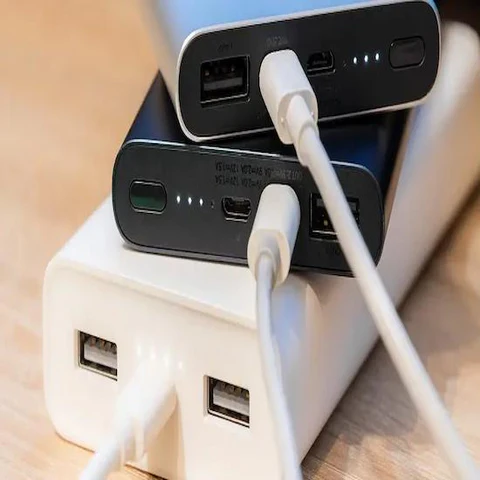

A power bank can suddenly stop charging, freeze on one battery level, blink endlessly, refuse to turn on, or stop detecting phones altogether. In many cases, the battery itself is not dead. The internal protection system simply needs a reset.
The good news is that most power banks can be reset at home without opening the device or replacing the battery.
I will explain how to reset a power bank safely, what causes these failures, which reset methods actually work, and when a battery pack is beyond recovery.
Why Power Banks Need Resetting
Modern power banks are controlled by protection circuits called BMS systems (Battery Management Systems).
These systems monitor:
- voltage
- heat
- charging speed
- short circuits
- overcurrent
- battery balancing
When something abnormal happens, the controller may enter protection mode.
That can make the power bank appear dead even though the battery cells are still healthy.
Common triggers include:
- using damaged cables
- overheating
- charging too many devices
- long-term storage
- deeply discharged cells
- unstable chargers
- water exposure
- voltage spikes
This is especially common with high-capacity USB-C PD and Qi2 power banks.
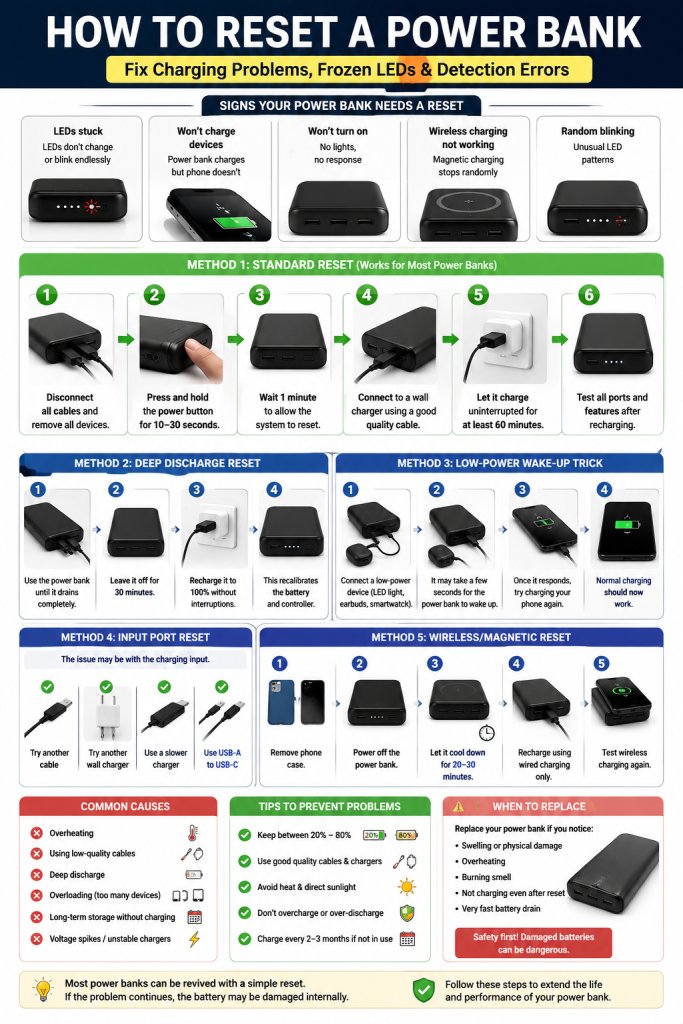
Signs Your Power Bank Needs a Reset
Frozen LED Indicators
The LEDs stay stuck on one percentage or blink continuously.
Example:
- always showing 25%
- flashing without charging
- LEDs turning on but no output power
Power Bank Charges but Won’t Output Power
The battery itself charges normally, but:
- phones are not detected
- charging starts and stops
- USB ports stop responding
This often means the controller locked the output system.
Power Bank Won’t Turn On
Sometimes:
- no LEDs appear
- button does nothing
- charging cable shows no activity
This can happen after:
- deep discharge
- overheating
- long storage periods
Wireless Charging Stops Working
Qi and Qi2 magnetic power banks occasionally freeze after overheating.
Symptoms include:
- magnetic charging connects briefly
- charging disconnects randomly
- wireless pad no longer activates
A reset can restore the charging controller.
Method 1: Standard Power Bank Reset
This works on many brands including:
- Anker
- Baseus
- Xiaomi
- Ugreen
- Romoss
- Aukey
- Belkin
- Mophie
- Iniu
Steps
- Disconnect every cable.
- Remove all connected devices.
- Press and hold the power button for 10-30 seconds.
- Wait 1 minute.
- Connect the power bank to a wall charger.
- Leave it charging for at least 60 minutes.
Afterward:
- test USB-A ports
- test USB-C ports
- test wireless charging if available
This resets many controller lockups.
Method 2: Deep Discharge Reset
Sometimes the controller becomes unstable because the voltage readings are incorrect.
A full discharge and recharge cycle may recalibrate the system.
How to Do It
- Connect a phone or USB device.
- Drain the power bank completely.
- Leave it off for 30 minutes.
- Recharge it uninterrupted to 100%.
This method works surprisingly well on older lithium-ion battery packs.
Method 3: Low-Power Wake-Up Trick
Some power banks enter sleep mode after sitting unused for months.
Especially common with:
- old Xiaomi power banks
- cheap generic models
- low-cost USB-C PD batteries
Wake-Up Method
Use:
- a low-power USB device
- USB LED light
- Bluetooth earbuds
- smartwatch charger
These devices sometimes trigger the controller when phones cannot.
Once the power bank “wakes up,” normal charging usually returns.
Method 4: Input Port Reset
Many people think the battery is dead when the actual problem is the charging input.
USB-C ports can freeze after:
- unstable fast charging
- poor-quality cables
- water contamination
- overheating
Fix
Try:
- another cable
- another wall charger
- slower charging brick
- USB-A to USB-C instead of USB-C PD temporarily
Sometimes fast charging negotiation itself is the problem.
Method 5: Reset Wireless Magnetic Power Banks
Qi2 and MagSafe-style batteries have additional controllers for wireless charging.
These systems sometimes overheat and temporarily disable themselves.
To Reset Magnetic Charging
- Remove any phone case.
- Fully power off the battery.
- Let it cool for 20-30 minutes.
- Recharge using wired charging only.
- Test wireless charging again afterward.
Heat is one of the biggest causes of wireless charging instability.
Why Some Power Banks Blink Continuously
Blinking LEDs usually indicate one of these issues:
| LED Behavior | Possible Cause |
|---|---|
| Fast blinking | Protection mode |
| One LED flashing | Low voltage |
| All LEDs flashing | Controller failure |
| Blinking while charging | Cable or adapter issue |
| Random blinking | Internal battery imbalance |
Different brands use different patterns, but protection mode is extremely common.
Can You Reset a Power Bank Without a Button?
Yes.
Some models have no power button at all.
In that case:
- disconnect everything
- leave the battery unused for 15-30 minutes
- reconnect to a wall charger
- allow uninterrupted charging
The controller often resets automatically.
Why Cheap Power Banks Fail More Often
Low-quality power banks usually have weaker:
- thermal protection
- voltage regulation
- battery balancing
- charging controllers
That causes:
- random shutdowns
- false battery readings
- overheating
- unstable USB-C PD negotiation
This is why many no-name batteries become unreliable after only a few months.
Can a Completely Dead Power Bank Be Repaired?
Sometimes yes. Sometimes no.
Usually Recoverable
- frozen controller
- deep sleep mode
- charging negotiation errors
- thermal shutdown
- battery calibration issues
Often Not Recoverable
- swollen battery cells
- water damage
- burnt USB ports
- physical impact damage
- internal short circuits
If the battery smells strange, swells, or becomes dangerously hot, stop using it immediately.
Is It Safe to Open a Power Bank?
Usually no.
Lithium-ion battery packs can become dangerous if punctured or shorted.
Opening the case may expose:
- raw battery cells
- fragile solder joints
- thermal sensors
- charging circuits
Unless you understand lithium battery repair, opening the power bank is risky.
How to Prevent Power Bank Problems
Avoid Full Discharge Constantly
Lithium batteries last longer when kept between:
- 20%
- 80%
Constant deep discharge stresses the cells.
Avoid Cheap Fast Chargers
Poor-quality charging bricks can destabilize USB-C PD systems.
Use trusted chargers whenever possible.
Keep It Cool
Heat is the biggest enemy of lithium batteries.
Avoid:
- leaving power banks in cars
- direct sunlight
- gaming while charging wirelessly
- charging under pillows or blankets
Charge It Every Few Months
Long-term storage can trigger deep sleep mode.
If unused:
- recharge the battery every 2-3 months
This helps preserve battery health.
Frequently Asked Questions
Why does my power bank charge itself but not my phone?
Usually the output controller entered protection mode. A reset often fixes it.
Why is my power bank blinking but not charging?
Possible causes include:
- bad cable
- damaged charger
- low voltage protection
- overheating
- controller freeze
Can a power bank reset itself?
Yes. Some models automatically recover after cooling down or recharging.
Why did my power bank stop working after fast charging?
USB-C PD negotiation errors sometimes freeze cheaper controllers, especially after overheating.
How long should a power bank last?
A good lithium-ion power bank usually lasts:
- 300-800 charge cycles
- roughly 2-5 years
Heat and poor charging habits shorten lifespan significantly.
Most “dead” power banks are not truly dead.
In many cases, the internal protection system simply locked the battery after:
- overheating
- voltage instability
- deep discharge
- charging errors
A proper reset can restore normal operation in minutes.
The safest approach is always:
- reset first
- recharge slowly
- test different cables
- avoid overheating
If the battery continues swelling, overheating excessively, or failing repeatedly, replacement is usually the smarter and safer option.
